Office attendance, simplified
Know who's in the office — in real time
WiAttend combines office WiFi check-in, GPS on-site tracking, and a powerful web dashboard for admins and managers. Employees use the mobile app; leadership gets the full picture.
New organization? Create your workspace
- Office WiFi verification
- GPS geofencing
- Real-time dashboard
- Excel exports

Product
The same dashboard your team uses every day
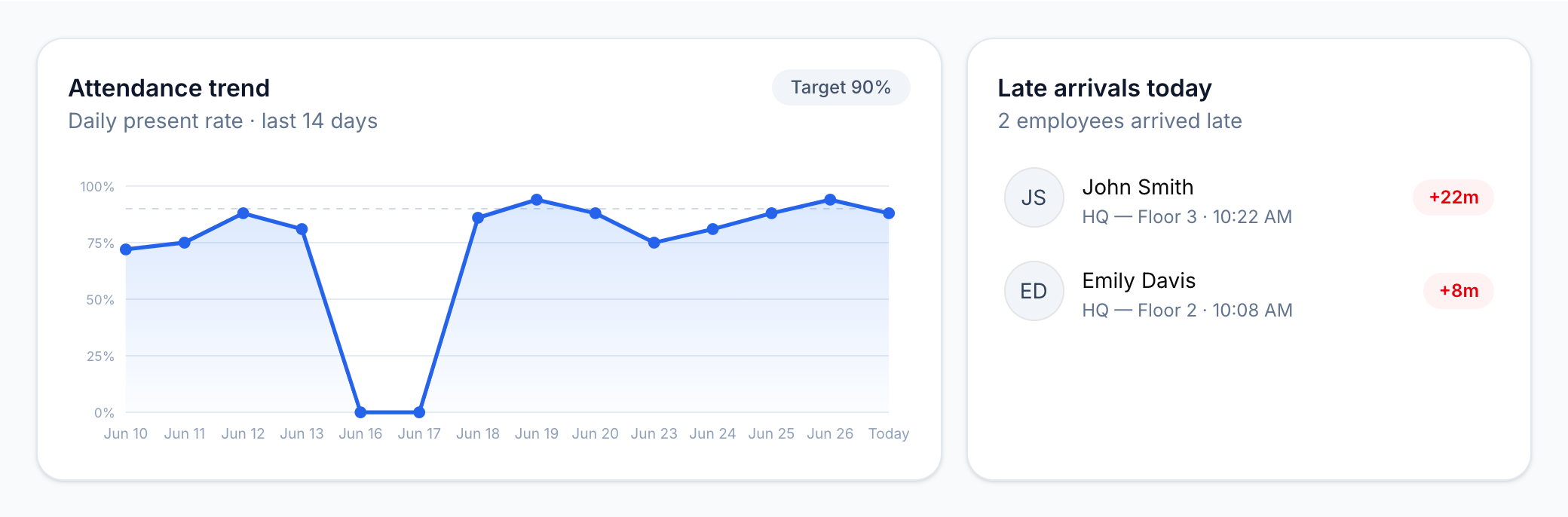
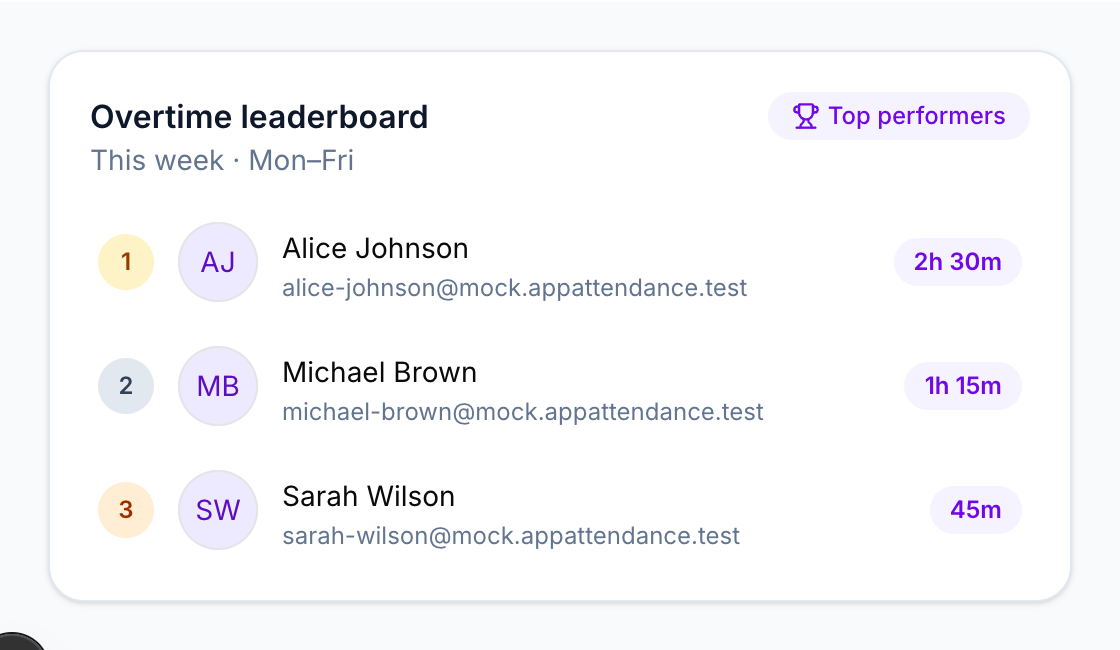
Real attendance metrics, live charts, and employee insights — built for admins and managers on the web.
Key metrics at a glance
See who is on-site right now, today's present count, late arrivals, and absences — all on one row of live stat cards that update as your team checks in.
Trends and late arrivals
Track attendance patterns over the last 14 days and drill into who arrived late today, with check-in times and minutes past schedule.
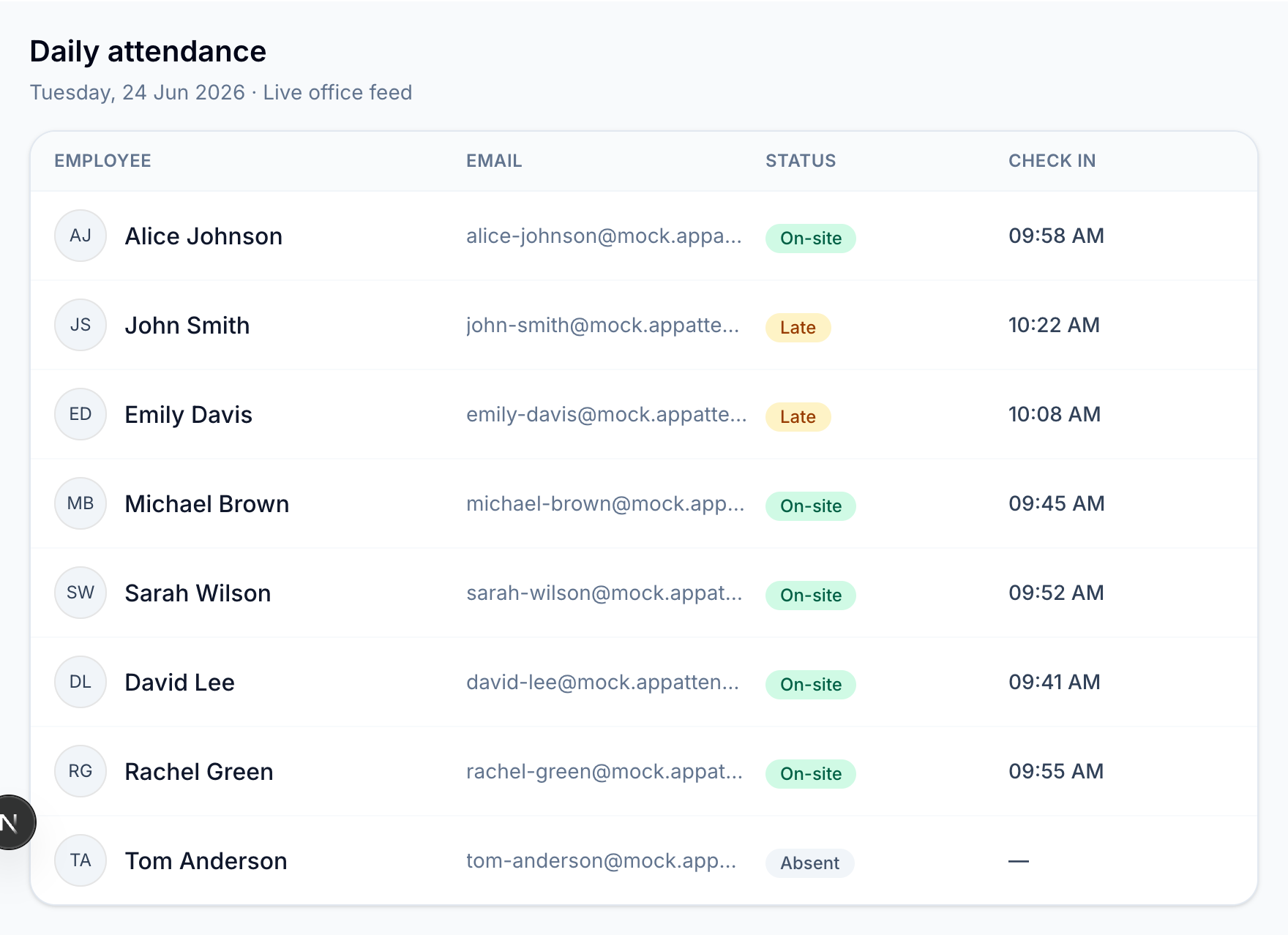
Live daily attendance feed
Review every employee's status for the day — on-site, late, or absent — with check-in times updated in real time as your team arrives.
Alice Johnson
4:12:08
since 09:58 AM
Office verification
Matched WiFi "HQ-Guest"
Last checked 10:02 AM · Ready to check out
TODAY
4h 12m
THIS WEEK
28h 30m
Today's timeline
Checked in
09:58 AM
HQ-Guest · WiFi verified
Mobile check-in for employees
Employees verify office WiFi from the app, then slide to check in or out. The dark header, verification card, and timeline match the real iOS and Android experience.
How it works
From setup to daily check-ins
WiAttend keeps attendance accurate without manual spreadsheets.
01
Set up your office
Create your organization, add office location, WiFi networks, and invite employees from the admin dashboard.
02
Employees join on mobile
Team members download the WiAttend app, enter their invite code, and register their trusted device.
03
Check in on office WiFi
Employees check in and out on approved office networks. Growth plans can also track on-site minutes inside your office geofence.
04
Track attendance in real time
Admins and managers view live stats, late arrivals, overtime, overrides, and export reports from the web dashboard.
Features
Built for modern offices
Everything you need to run attendance with confidence.
Office WiFi verification
Check-ins only count when employees are on approved office networks.
GPS geofencing
Background on-site time is tracked while checked in inside your office radius.
Admin & manager roles
Web dashboard access for organization admins and managers — employees use the mobile app.
Overrides & schedules
Handle holidays, custom shifts, half-days, leave, and manual attendance corrections.
Reports & exports
Download Excel attendance reports with hours worked, overtime, and on-site time.
Request workflows
Employees submit leave and half-day requests from mobile; admins review on the web.
Pricing
Simple, transparent plans
Start free for up to 5 employees. Upgrade as your team grows.
Free
$0
For very small teams trying WiAttend for the first time.
- Up to 5 employees
- Office WiFi check-in
- Admin dashboard
- Mobile app for employees
- Office calendar & working hours
Starter
$5/ month
For small offices that need reliable attendance tracking.
- Up to 20 employees
- Everything in Free
- Leave & half-day requests
Most popular
Growth
$20/ month
For growing teams that need GPS on-site tracking and location services.
- Up to 75 employees
- Everything in Starter
- Excel exports
- GPS geofencing & on-site tracking
- Custom shifts per employee
Business
$100/ month
For larger organizations with advanced needs and bigger headcount.
- Unlimited employees
- Everything in Growth
- Manager accounts
- Priority support
- Dedicated onboarding
Ready to manage attendance from the web?
Sign in as an admin or manager to access your dashboard, or create a new organization to get started.